By BECKY RUTHERFORD
Los Alamos
Sadly there was yet another horrible accident this week in Los Alamos, but as I was checking out the post from the Los Alamos Police Department, something else stood out to me.
Scammers!
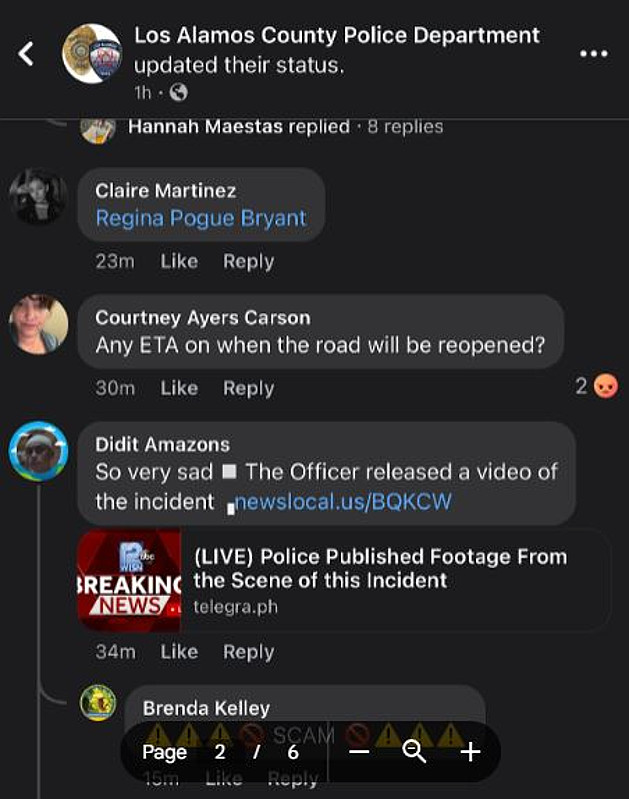
If you saw this post, you might have noticed there were quite a few comments. And most of them had links offering “live footage” of the accident. Yikes. Are the hairs on the back of your neck standing up yet? They should be! The scammy comments often contain a phrase such as “Terrible that this happened video” or “It’s scary what happened” and include a link to a website.
Once again, scammers count on people’s natural curiosity to trick them into clicking these links.
This is a super common scam. Scammers look for posts like this about accidents, or other interesting news bits, and spam the heck outta the comments with fake links offering footage of the accident.
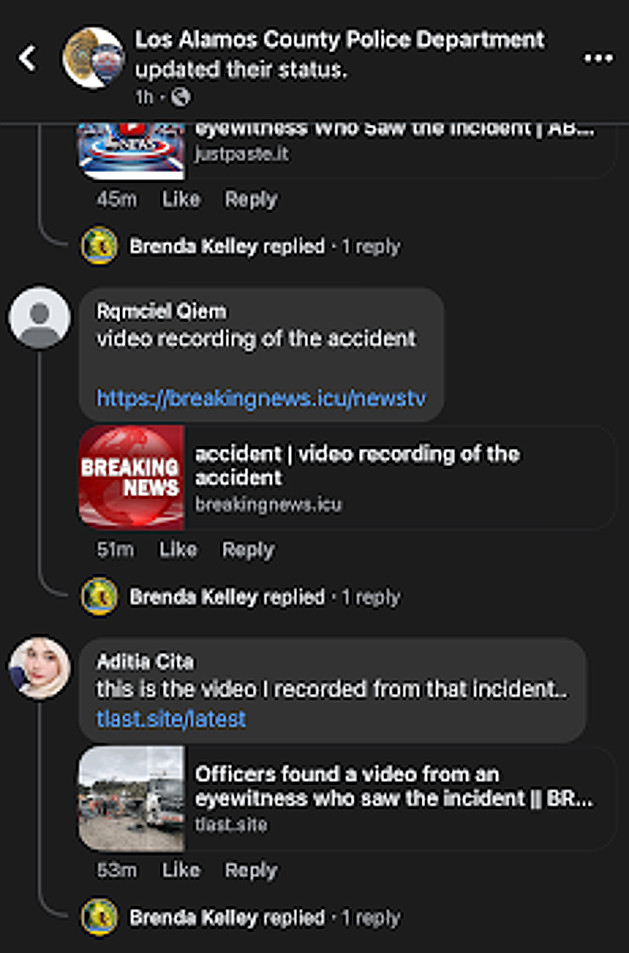
This is a scam, and if you look at the links you will notice the odd format of most of them. This is due to a URL shortener- a tool that converts long, complex web addresses (URLs) into shorter, more manageable links, making them easier to share and remember. Any time you see a shortened link like this, “bit.ly” etc. as an example, you should be a bit suspicious.
What could happen if you click one of these links? Best case scenario, just spam. But…It would be fairly easy to either steal your information, with a form requesting more info to access, or with a fake login page to Facebook, or possibly other accounts. If you enter your login credentials into these fake pages, they can be stolen by the scammers and used to access your account-unless you have MFA on your account!
The great thing about MFA (multi factor authentication) is that once it is on an account, nobody can access that account without getting the authentication code. I highly recommend setting up MFA on all your accounts, either with a cell phone, authentication app, or physical key like a Yubikey. Note that you can be tricked out of the code, but it requires a lot more work.
Another angle for this scam- they could get you to click on something to download, and trick you into downloading a virus that could damage your computer or phone. Yikes again.
Nothing good will come of clicking links like these, so just be aware of the scam, and avoid the temptation!
Here is some advice from Facebook for keeping your account safe:
- Protect your password
- Avoid reusing the same password across multiple websites or apps. Don’t use your Facebook password anywhere else online, and never share it with other people. Your password should be hard to guess, so don’t include your name or common words. Use unique, strong passwords or passphrases, for all of your accounts.
- Learn more about creating a strong password.
- Set up two-factor authentication and other security options. With two-factor authentication, you’ll be asked to enter a special login code each time someone tries to access your account from a browser or mobile device we don’t recognize.
- If you’re logged into Facebook on a computer, you can use Security Checkup to review your security settings or to set up two factor authentication.
- You can also get alerts about unrecognized logins.
- Never share your login information
- Scammers may create fake websites that look like Facebook and ask you to log in with your email and password.
- Always check the website’s URL before you enter your login information. When in doubt, type www.facebook.com into your browser to get to Facebook.
- Don’t forward emails from Meta to other people, since they may have sensitive information about your account.
- Never click suspicious links, even if they appear to come from a friend or a company you know. This includes links on Facebook (example: on posts), in emails or texts.
- Keep in mind that Meta will never ask you for your password in an email.
- If you suspect that a link on Facebook is suspicious, report it.
- Watch out for malicious software
- Malicious software can cause damage to a computer, server or computer network.
- Learn the signs of an infected computer or device and how to remove malicious software.
Stay safe online, and don’t click the scam links in comments!